

Pylontech Battery
The Pylontech component allows you to pull data from Pylontech Batteries into ESPHome. It uses UART for communication.
Once configured, you can use sensors as described below for your projects.
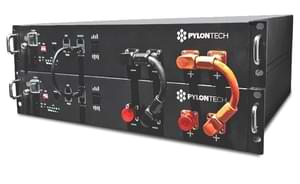
Hardware Setup
Section titled “Hardware Setup”You can connect to Pylontech Batteries using the port labeled “Console”. Any connections via CAN or RS485 (e.g. to an inverter) are untouched and remain functional.
The console port offers a RS232 interface using a RJ11 or RJ45 connector. The voltage levels are not TTL-compatible. A RS232 transceiver must be placed between the Batteries and the ESPHome device. MAX3232-based transceivers have been tested and work well.
If you have multiple batteries you need to connect to the master battery’s console port.
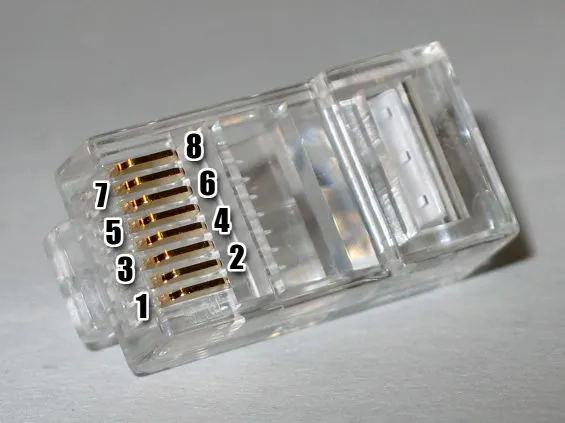
Pylontech RJ45 Console Port (US2000C, US3000C, US5000C)
Section titled “Pylontech RJ45 Console Port (US2000C, US3000C, US5000C)”| RJ45 Pin | TIA-568B Color | TIA-568A Color | Function | Connect to |
|---|---|---|---|---|
| 3 | White/Green | White/Orange | Pylontech TX | ESPHome RX via transceiver |
| 6 | Green | Orange | Pylontech RX | ESPHome TX via transceiver |
| 8 | Brown | Brown | GND | GND |
Pylontech RJ11 Console Pinout (US2000B, US2000)
Section titled “Pylontech RJ11 Console Pinout (US2000B, US2000)”| RJ11 Pin | Function | Connect to |
|---|---|---|
| 2 | Pylontech RX | ESPHome TX via transceiver |
| 3 | Pylontech TX | ESPHome RX via transceiver |
| 4 | GND | GND |
Component/Hub
Section titled “Component/Hub”# Example configuration entrypylontech:Configuration variables
Section titled “Configuration variables”- id (Required, ID): The id to use for this Pylontech component.
- uart_id (Optional): The uart Bus ID
- update_interval (Optional, Time): The interval to check the sensor. Defaults to
60s.
Sensor
Section titled “Sensor”All values are reported for every Pylontech battery individually.
# Example configuration entrysensor:  - platform: pylontech    battery: 1
    voltage:      name: "Battery1 Voltage"    current:      name: "Battery1 Current"    coulomb:      name: "Battery1 State of Charge"
Configuration variables
Section titled “Configuration variables”- pylontech_id (Optional): Manually specify the ID of the pylontech instance if there are multiple.
- battery (Required): Which battery to monitor. 1 stands for the main battery, 2..16 for child batteries.
- voltage (Optional): Voltage of the battery. All options from Sensor.
- current (Optional): Current flowing into the battery. Negative when discharging. All options from Sensor.
- coulomb (Optional): State of Charge in percent. All options from Sensor.
- temperature (Optional): Temperature. All options from Sensor.
- temperature_low (Optional): Historic minimum temperature. All options from Sensor.
- temperature_high (Optional): Historic maximum temperature. All options from Sensor.
- voltage_low (Optional): Voltage of the lowest cell. All options from Sensor.
- voltage_high (Optional): Voltage of the highest cell. All options from Sensor.
- mos_temperature (Optional): Temperature of the mosfets. All options from Sensor.
- cells (Optional): Cells of this battery to monitor. See Monitoring Individual Cells.
Text Sensor
Section titled “Text Sensor”# Example configuration entrytext_sensor: - platform: pylontech pylontech_id: pylontech0 battery: 1
base_state: id: bat1_base_state name: "Battery1 Base State"Configuration variables
Section titled “Configuration variables”- pylontech_id (Optional): Manually specify the ID of the pylontech instance if there are multiple.
- battery (Required): Which battery to monitor. 1 stands for the main battery, 2..16 for child batteries.
- base_state (Optional): Base state. Usually reads
Dischg,ChargeorIdle. All options from Text Sensor. - voltage_state (Optional): Voltage state. Usually reads
Normal. All options from Text Sensor. - current_state (Optional): Current state. Usually reads
Normal. All options from Text Sensor. - temperature_state (Optional): Temperature state. Usually reads
Normal. All options from Text Sensor.
Monitoring Individual Cells
Section titled “Monitoring Individual Cells”Each battery reports the voltage and temperature of its cells, numbered 0 to 14. After every pwr reading
the component sends one bat N command for each battery that lists cells, so the cell sensors update at
the same interval as the battery sensors.
# Example configuration entrysensor: - platform: pylontech battery: 1 cells: - cell: 0 voltage: name: "Battery1 Cell0 Voltage" temperature: name: "Battery1 Cell0 Temperature" - cell: 1 voltage: name: "Battery1 Cell1 Voltage" temperature: name: "Battery1 Cell1 Temperature"- cell (Required): Which cell to monitor, 0 to 14. Each cell may be listed once per battery.
- voltage (Optional): Voltage of this cell. All options from Sensor.
- temperature (Optional): Temperature of this cell. All options from Sensor.
At least one of voltage or temperature is required for each cell.
pylontech.set_cell_polling Action
Section titled “pylontech.set_cell_polling Action”Reading the cells adds one bat command per battery to every update. This action stops or resumes those
commands at runtime. Cell polling is on at boot, and the action does nothing when no cells are configured.
switch: - platform: template name: "Pylontech poll individual cells" restore_mode: RESTORE_DEFAULT_ON optimistic: true entity_category: "config" turn_on_action: - pylontech.set_cell_polling: id: pylontech0 enabled: true turn_off_action: - pylontech.set_cell_polling: id: pylontech0 enabled: false- id (Required, ID): The ID of the pylontech component.
- enabled (Required, boolean, templatable):
truereads the cells after each update,falseskips them.
Energy Monitoring
Section titled “Energy Monitoring”By combining template sensors and integration sensors one can monitor the energy flowing into and out of all batteries combined, ready for Homeassistant Energy Monitoring.
sensor:  - platform: template    id: pylontech_power    name: "Pylontech power"    unit_of_measurement: W    lambda: |-      auto pwr1 = id(bat1_voltage).state * id(bat1_current).state;      auto pwr2 = id(bat2_voltage).state * id(bat2_current).state;      auto pwr = pwr1 + pwr2;      id(combined_charge_power).publish_state(max(pwr, 0.0f));      id(combined_discharge_power).publish_state(max(-pwr, 0.0f));      return pwr;    update_interval: 5s    device_class: power    state_class: measurement
  - platform: template    id: combined_charge_power
  - platform: template    id: combined_discharge_power
  - platform: integration    name: "Pylontech charging"    sensor: combined_charge_power    time_unit: h    state_class: total_increasing    device_class: energy    unit_of_measurement: "Wh"
  - platform: integration    name: "Pylontech discharging"    sensor: combined_discharge_power    time_unit: h    state_class: total_increasing    device_class: energy    unit_of_measurement: "Wh"