

Selec Energy Monitor
The selec_meter sensor platform allows you to use Selec Modbus energy monitors with ESPHome. Two
models are supported, selected with the model option:
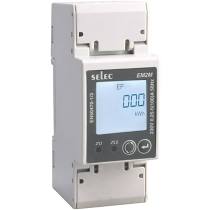
- EM2M (website): a single-phase energy meter. This is the default model.
- EM4M: a 3-phase DIN-rail energy meter, exposing per-phase voltage/current/power/energy in addition to the aggregate quantities.
The communication with this component is done via a UART using
Modbus. You must therefore have a uart: entry in your configuration
with both the TX and RX pins set to some pins on your board and the baud rate set to 9600.
# Example configuration entry, EM2M (default model)uart:  rx_pin: D1  tx_pin: D2  baud_rate: 9600  stop_bits: 1
sensor:  - platform: selec_meter    total_active_energy:      name: "SelecEM2M Total Active Energy"    import_active_energy:      name: "SelecEM2M Import Active Energy"    export_active_energy:      name: "SelecEM2M Export Active Energy"    total_reactive_energy:      name: "SelecEM2M Total Reactive Energy"    import_reactive_energy:      name: "SelecEM2M Import Reactive Energy"    export_reactive_energy:      name: "SelecEM2M Export Reactive Energy"    apparent_energy:      name: "SelecEM2M Apparent Energy"    active_power:      name: "SelecEM2M Active Power"    reactive_power:      name: "SelecEM2M Reactive Power"    apparent_power:      name: "SelecEM2M Apparent Power"    voltage:      name: "SelecEM2M Voltage"    current:      name: "SelecEM2M Current"    power_factor:      name: "SelecEM2M Power Factor"    frequency:      name: "SelecEM2M Frequency"    maximum_demand_active_power:      name: "SelecEM2M Maximum Demand Active Power"    maximum_demand_reactive_power:      name: "SelecEM2M Maximum Demand Reactive Power"    maximum_demand_apparent_power:      name: "SelecEM2M Maximum Demand Apparent Power"
# Example configuration entry, EM4M (3-phase)sensor: - platform: selec_meter model: em4m phase_a: voltage: name: "SelecEM4M Voltage L1" current: name: "SelecEM4M Current L1" active_power: name: "SelecEM4M Active Power L1" phase_b: voltage: name: "SelecEM4M Voltage L2" current: name: "SelecEM4M Current L2" active_power: name: "SelecEM4M Active Power L2" phase_c: voltage: name: "SelecEM4M Voltage L3" current: name: "SelecEM4M Current L3" active_power: name: "SelecEM4M Active Power L3" active_power: name: "SelecEM4M Total Active Power" import_active_energy: name: "SelecEM4M Total Import Active Energy" export_active_energy: name: "SelecEM4M Total Export Active Energy" frequency: name: "SelecEM4M Frequency" serial_number: name: "SelecEM4M Serial Number"Configuration Variables
Section titled “Configuration Variables”-
model (Optional, string): The meter model, one of
em2morem4m. Defaults toem2m.total_active_energy,total_reactive_energyandapparent_energyare only available withmodel: em2m; the EM4M reports energy asimport_*_energy/export_*_energytotals and per phase insidephase_a,phase_bandphase_c. Those phase groups and the other EM4M-only options below are only available withmodel: em4m. -
byte_order (Optional, string): The order of the two 16-bit Modbus registers that make up each value, one of
big_endian(high word first, ABCD) orlittle_endian(low word first, CDAB). Only the two words are swapped; the bytes inside each word are not reversed. The meter’s own namesmsrf(same asbig_endian) andlsrf(same aslittle_endian) are also accepted. This must match the meter’s own “Endianness Selection” setting. If not set, it defaults to the factory default for the selectedmodel:little_endianfor EM2M,big_endianfor EM4M.
On model: em4m, active_power, reactive_power, apparent_power, voltage, current, power_factor,
frequency and the three maximum_demand_* options read the meter’s Total/Average registers; the
phase_a/phase_b/phase_c groups further down give the individual phase values.
-
total_active_energy (Optional, EM2M only): Use the total active energy value of the sensor in kilo watt hours. All options from Sensor.
-
import_active_energy (Optional): Use the import active energy value of the sensor in kilo watt hours. All options from Sensor.
-
export_active_energy (Optional): Use the export active energy value of the sensor in kilo watt hours. All options from Sensor.
-
total_reactive_energy (Optional, EM2M only): Use the total reactive energy value of the sensor in kilo volt amps reactive hours. All options from Sensor.
-
import_reactive_energy (Optional): Use the import reactive energy value of the sensor in kilo volt amps reactive hours. All options from Sensor.
-
export_reactive_energy (Optional): Use the export reactive energy value of the sensor in kilo volt amps reactive hours. All options from Sensor.
-
apparent_energy (Optional, EM2M only): Use the apparent energy value of the sensor in kilo volt amps hours. All options from Sensor.
-
active_power (Optional): Use the (active) power value of the sensor in watts. All options from Sensor.
-
reactive_power (Optional): Use the reactive power value of the sensor in VAR. All options from Sensor.
-
apparent_power (Optional): Use the apparent power value of the sensor in VA. All options from Sensor.
-
voltage (Optional): Use the voltage value of the sensor in volts. All options from Sensor.
-
current (Optional): Use the current value of the sensor in amperes. All options from Sensor.
-
power_factor (Optional): Use the power factor value of the sensor. All options from Sensor.
-
frequency (Optional): Use the frequency value of the sensor in hertz. All options from Sensor.
-
maximum_demand_active_power (Optional): Use the maximum demand (active) power value of the sensor in watts. All options from Sensor.
-
maximum_demand_reactive_power (Optional): Use the maximum demand reactive power value of the sensor in VAR. All options from Sensor.
-
maximum_demand_apparent_power (Optional): Use the maximum demand apparent power value of the sensor in VA. All options from Sensor.
-
update_interval (Optional, Time): The interval to check the sensor. Defaults to
10s. -
address (Optional, int): The address of the sensor if multiple sensors are attached to the same UART bus. You will need to set the address of each device manually. Defaults to
1.
EM4M Options
Section titled “EM4M Options”The following options are only available with model: em4m, and expose the per-phase, line-to-line
and net energy quantities the EM4M provides in addition to the aggregate ones above. Each sensor
accepts all options from Sensor.
-
phase_a (Optional): The group of exposed sensors for phase A (L1).
-
voltage (Optional): Line-to-neutral voltage, in volts.
-
current (Optional): Current, in amperes.
-
active_power (Optional): Active power, in watts.
-
reactive_power (Optional): Reactive power, in VAR.
-
apparent_power (Optional): Apparent power, in VA.
-
power_factor (Optional): Power factor.
-
import_active_energy (Optional): Import active energy, in kilo watt hours.
-
export_active_energy (Optional): Export active energy, in kilo watt hours.
-
import_reactive_energy (Optional): Import reactive energy, in kilo volt amps reactive hours.
-
export_reactive_energy (Optional): Export reactive energy, in kilo volt amps reactive hours.
-
apparent_energy (Optional): Apparent energy, in kilo volt amps hours.
-
-
phase_b (Optional): The group of exposed sensors for phase B (L2).
- All options from phase_a
-
phase_c (Optional): The group of exposed sensors for phase C (L3).
- All options from phase_a
-
voltage_l12, voltage_l23, voltage_l31 (Optional): Line-to-line voltage, in volts.
-
average_voltage_ll (Optional): Average line-to-line voltage, in volts.
-
net_active_energy_mains, net_reactive_energy_mains, net_apparent_energy_mains (Optional): Net (import − export) energy from the mains source, in kilo watt hours / kilo volt amps reactive hours / kilo volt amps hours respectively. These use the
totalstate class, since a net value can go down as well as up. -
net_active_energy_dg, net_reactive_energy_dg, net_apparent_energy_dg (Optional): Net (import − export) energy from a DG (generator) source, same units and state class as above. These, along with
dg_sensingbelow, only report meaningful values when the meter’s “Dual Source” setting is enabled; on a single-source installation they read0. -
serial_number (Optional): Exposes the meter’s serial number as a Text Sensor. All options from Text Sensor.
-
dg_sensing (Optional): Whether the DG (generator) source is currently sensed, as a Binary Sensor. All options from Binary Sensor.