

CFSensor XGZP68xx Differential Pressure Sensor
CFSensor makes multiple generations of sensors with identical model numbers such as the 6899D or
6897D, but unfortunately with completely different I²C interfaces. This component supports both,
and you select the right one with the variant option:
| Variant | Part number | I²C address | Datasheet | Pressure scaling |
|---|---|---|---|---|
xgzp68xx (default) | XGZP68xxD, no C after D | 0x6d | v3.0 or earlier | k_value |
xgzp6899dc | XGZP6899DCxxxxxx | 0x58 | after v3.0 | pressure_min and pressure_max |
You can identify which part you have from the part number (the C after the D marks the newer part), or from the I²C address that the I²C bus scan shows in the logs at boot.
Unfortunately CFSensor have removed from their website the datasheets for the non-C series of sensors. You will need to specifically find the older datasheet from another source. The datasheets after v3.0 from CFSensor describe the C series which is a completely different device even though it has an identical model number to the ≤ v3.0 device.
The xgzp6899dc variant has been tested with the XGZP6899DC. Other C series models such as the
XGZP6897DC may use the same interface, but they have not been tested.
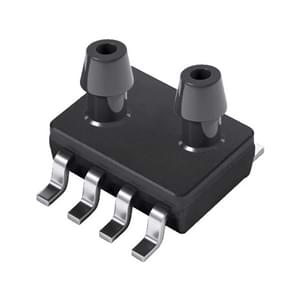
To use the sensor, set up an I²C Bus and connect the sensor to the specified pins.
# Example configuration entry for a non-C series sensor# It uses a filter offset to calibrate the sensorsensor: - platform: xgzp68xx k_value: 16384 temperature: name: "Temperature" pressure: name: "Differential Pressure" oversampling: "32768x" filters: - offset: 40.5Configuration Variables
Section titled “Configuration Variables”- variant (Optional, string): The type of sensor, see the table above. One of
xgzp68xxorxgzp6899dc. Defaults toxgzp68xx. - temperature (Optional): All options from Sensor.
- pressure (Optional): All options from Sensor.
- oversampling (Optional): One of
256x,512x,1024x,2048x,4096x,8192x,16384x,32768x. It is not possible to disable oversampling. For thexgzp68xxvariant this defaults to4096x. For thexgzp6899dcvariant the factory setting of the sensor is kept if this is not specified.
- oversampling (Optional): One of
- k_value (Optional, int): Only for the
xgzp68xxvariant. The K value comes from the list below. It will default to 4096 if not specified. - pressure_min (Required for
xgzp6899dcwith a pressure sensor, float): Only for thexgzp6899dcvariant. The lowest pressure of the rated range of the part, in Pa. A unit such as-0.5kPamay also be used. - pressure_max (Required for
xgzp6899dcwith a pressure sensor, float): Only for thexgzp6899dcvariant. The highest pressure of the rated range of the part, in Pa. A unit such as0.5kPamay also be used. - address (Optional, int): The I²C address of the sensor. Defaults to
0x6dfor thexgzp68xxvariant and0x58for thexgzp6899dcvariant. - update_interval (Optional, Time): The interval to check the sensor.
Defaults to
60s.
Non-C Series (xgzp68xx)
Section titled “Non-C Series (xgzp68xx)”The sensors come in a series of pressure ranges. The now hard to find datasheet lists
a table of pressure ranges to k_value, which you will need to set in your configuration:
- -0.5 kPa to +0.5 kPa (
k_value = 16384) - -1 kPa to +1 kPa (
k_value = 8192) - -2.5 kPa to +2.5 kPa (
k_value = 2048) - -5 kPa to +5 kPa (
k_value = 1024) - -10 kPa to +10 kPa (
k_value = 512) - -50 kPa to +50 kPa (
k_value = 128)
XGZP6899DC (xgzp6899dc)
Section titled “XGZP6899DC (xgzp6899dc)”This sensor does not use a K value. Instead, set pressure_min and pressure_max to the rated
range of your part. The range is part of the part number, and the datasheet lists the common ones.
For example, for an XGZP6899DC005HPDPN (-500 Pa to +500 Pa):
sensor: - platform: xgzp68xx variant: xgzp6899dc pressure_min: -500 pressure_max: 500 temperature: name: "Temperature" pressure: name: "Differential Pressure"For a sensor that only measures positive pressure, such as 0 to 10 kPa, use pressure_min: 0 and
pressure_max: 10kPa. For a sensor that only measures negative pressure, such as -20 to 0 kPa, use
pressure_min: -20kPa and pressure_max: 0.
The temperature calibration values are read from the sensor at boot, so there is nothing to configure for the temperature sensor.
Calibration
Section titled “Calibration”On power up, the sensor will read an offset. You will need to calibrate the sensor which can be done by checking the value that is returned when the ports are open to the air. You can use the offset option to correct the reading. For example, if your sensor is reading -40Pa when the ports are disconnected, you can set the offset to 40.
If the sensor is running for a time, you will find that the zero point does drift after a while, especially if the sensor is used to detect pressure shocks. Designing in a way to periodically equalise the pressure between the ports so a new offset can be determined would be wise.